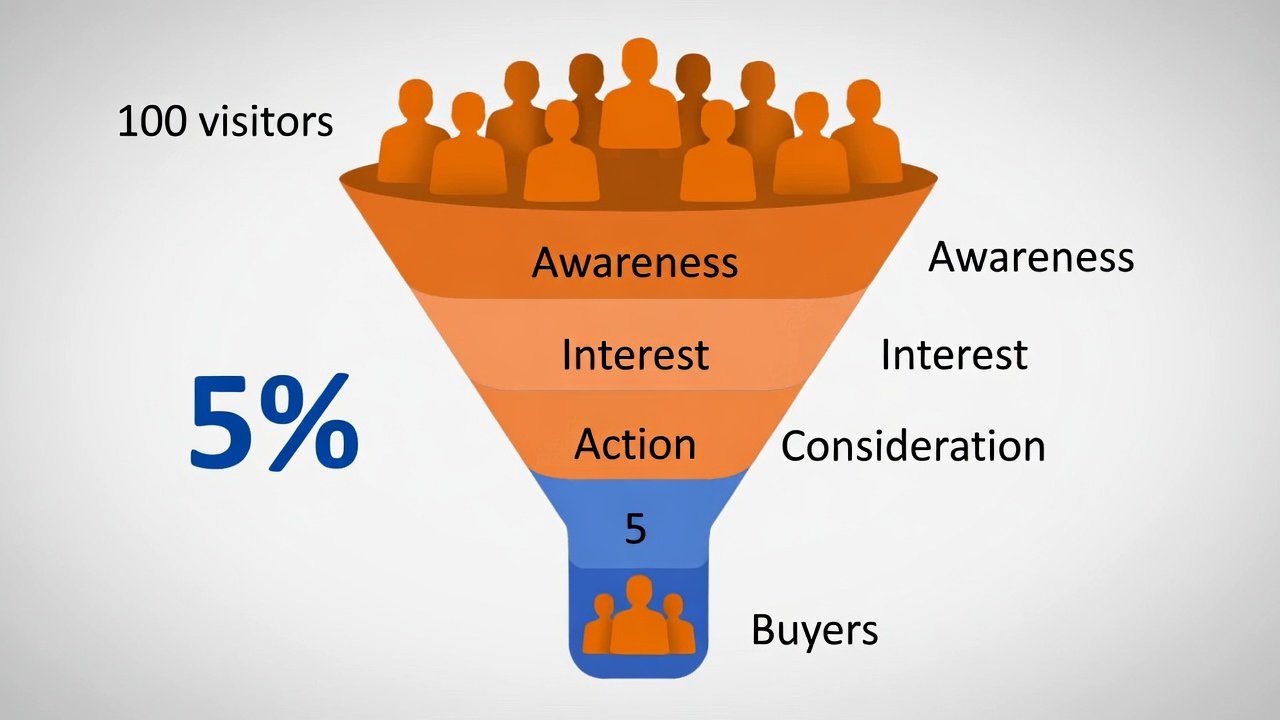
What Is Conversion Rate?
Conversion rate is the percentage of visitors who buy from your shop. If 100 people visit and 5 buy, your conversion rate is 5%. Simple math.
Traffic is just the number of visitors. You can have thousands of views and zero sales. Or you can have 50 views and 10 sales. Which shop makes more money?
Conversion rate matters more because it shows your shop actually works. Traffic alone does not pay bills. Sales do.
Why Traffic Alone Can Mislead You
Many new sellers chase views. They think more traffic equals more sales. But this is not always true.
Imagine two shops. Shop A gets 1,000 views and makes 5 sales. Shop B gets 200 views and makes 10 sales. Shop B earns more with less traffic.
Why? Shop B converts better. Their listings convince visitors to buy. That skill is worth more than raw traffic numbers.
The Math That Proves It
Let's use real numbers. Say your average order is $30.
Scenario 1: 500 visitors, 2% conversion rate. That is 10 sales. Revenue: $300.
Scenario 2: 100 visitors, 10% conversion rate. That is 10 sales. Revenue: $300.
Same revenue. But Scenario 2 took far less effort to attract visitors. Your time and energy go further.
Now Double the Conversion Rate
Keep 100 visitors. Raise conversion to 20%. Now you make 20 sales. Revenue: $600.
You doubled your income without finding more visitors. That is the power of focusing on conversion.
Traffic growth is hard and slow. Conversion improvements can happen fast with small tweaks.
What Affects Your Conversion Rate on Etsy
Many small things add up. Fix these, and more visitors become buyers.
Clear, Honest Photos
Buyers cannot touch your item. Photos must show exactly what they get. Use bright, natural light. Show multiple angles.
Include a photo with a common object for scale. A coin, a hand, or a ruler helps buyers understand size.
Blurry or dark photos make buyers scroll past. Good photos build trust fast.
Titles That Answer Questions
Your title should tell buyers what the item is and who it is for. "Handmade Lavender Soap for Sensitive Skin" works better than "Pretty Soap."
Use words buyers actually search for. Think like a shopper. What would you type to find your item?
Clear titles reduce confusion. Confused buyers do not buy.
Descriptions That Build Confidence
Answer questions before buyers ask. List materials, size, care instructions, and processing time.
Write like you talk. Friendly, human words feel more trustworthy than robotic phrases.
End with a gentle call to action. "Message me for custom colors" or "Add to cart to ship today."
Fair, Transparent Pricing
Price your item to cover costs and make profit. But stay competitive. Check similar listings for reference.
If you charge shipping, state it clearly. Surprise costs at checkout make buyers abandon carts.
Consider offering free shipping over a threshold. This encourages larger orders and reduces friction.
Reviews and Social Proof
Buyers trust other buyers. Positive reviews lower the risk of trying a new shop.
Encourage happy customers to leave feedback. A simple thank-you note works wonders.
Respond to all reviews, good or bad. This shows you care about your customers.
Step-by-Step: Improve Your Conversion Rate
Follow these simple steps. Test one change at a time. Track what works.
Step 1: Audit Your Top 5 Listings
Go to Shop Manager > Stats. Find your five most-viewed listings. Check their conversion rates.
Which listings get views but no sales? These need work. Which listings convert well? Learn from them.
Write down one thing to improve for each low-converting listing.
Step 2: Fix Your First Photo
Your first photo is your handshake with buyers. Make it count.
Use a clean background. Show the whole item. Make sure lighting is bright and even.
Test a new first photo on one listing. Watch views and sales for one week. Keep the winner.
Step 3: Simplify Your Title
Long, confusing titles hurt conversions. Short, clear titles help.
Put the most important words first. "Personalized Dog Collar with Name and Phone Number" beats a jumbled phrase.
Read your title out loud. If it sounds awkward, rewrite it.
Step 4: Add a Trust Signal
Buyers worry about buying from new shops. Ease their fears.
Mention your process: "Handmade with care in my home studio." Or your guarantee: "Love it or message me."
Small trust builders reduce hesitation. Hesitation kills conversions.
Step 5: Test and Track
Change one thing at a time. If you change photos and titles together, you will not know what worked.
Give each test 7-14 days. Etsy's algorithm needs time to adjust.
Track results in a simple note: Listing name, change made, views before/after, sales before/after.
When Traffic Still Matters
Conversion rate is more important, but traffic is not useless. You need some visitors to convert.
Focus on conversion first. Then grow traffic. This order saves time and money.
Good conversion makes traffic efforts pay off. Bad conversion wastes every visitor you attract.
Smart Ways to Grow Traffic After Conversion Is Strong
Use Etsy Ads on your best-converting listings only. Do not advertise weak listings.
Share your shop on social media. Show behind-the-scenes content. People buy from people they like.
Optimize for SEO. Use keywords buyers search for. This brings free, targeted traffic over time.
Remember: Traffic without conversion is noise. Conversion with traffic is growth.
Common Mistakes That Hurt Conversion
Even smart sellers make these errors. Avoid them to protect your sales.
Mistake 1: Too Many Choices
Listing 50 similar items confuses buyers. They leave without choosing anything.
Curate your shop. Show your best work. Guide buyers to clear choices.
Fewer, stronger listings convert better than many weak ones.
Mistake 2: Hiding Important Details
Buyers hate surprises. If shipping takes 3 weeks, say so upfront.
Put key info near the top of your description. Mobile shoppers may not scroll far.
Clarity builds trust. Trust builds sales.
Mistake 3: Ignoring Mobile Shoppers
Most Etsy buyers use the app. Long paragraphs and tiny photos frustrate them.
Use short sentences. Break up text with bullet points. Show clear, zoomable photos.
Test your listing on your phone. If it is hard to read, fix it.
How to Track Conversion Rate on Etsy
Etsy shows conversion data in Shop Manager. Use it to improve.
Go to Stats > Listings. See views and orders for each item. Etsy calculates conversion rate for you.
Check this data weekly. Spot trends early. Fix problems before they cost sales.
Simple Conversion Tracking Sheet
Create a basic note with columns: Listing Name, Views Last 7 Days, Orders Last 7 Days, Conversion Rate, Change Tested.
Update it weekly. Look for patterns. Double down on what works.
Tracking takes five minutes. It saves hours of guessing later.
Final Checklist: Conversion-Ready Shop
Before you chase more traffic, confirm these points:
- My first photos are bright, clear, and show the whole item
- My titles answer what the item is and who it is for
- My descriptions include size, materials, and processing time
- My pricing is fair and transparent with no surprise costs
- I have at least five reviews or trust signals in my shop
- I test one change at a time and track the results
If you checked most boxes, your shop is ready to convert. Now you can grow traffic with confidence.
Final Thoughts on Conversion vs Traffic
Chasing traffic feels exciting. But conversion builds a real business. Focus on turning visitors into buyers first.
Small improvements add up. A 1% conversion increase can double your sales without more marketing.
Be patient. Test one change at a time. Learn from your data. Grow steadily.
You do not need thousands of views to succeed. You need the right visitors and a shop that convinces them to buy.
Keep creating. Keep optimizing. And keep serving buyers so well they come back and tell their friends.
Pro Tip: Save your best-converting listing as a template. Use its structure, tone, and photo style for new items. Consistency builds momentum.